


Your LinkedIn profile gets views every week. How many of those viewers turn into leads? For most people selling B2B services, the honest answer is zero. They post, they get impressions, maybe a few comments from the same five people. But the profile itself sits there doing nothing. A prospect clicks through after a good post, sees a headline that says “Founder & CEO at [Company],” scans a bio that reads like a résumé, and bounces. That prospect is gone.
LinkedIn profile optimization is usually framed as a job-seeker thing: look professional, fill in your experience, get found by recruiters. But if you’re trying to build pipeline, the rules are completely different. You’re not optimizing for a recruiter scanning 200 profiles on a Tuesday. You’re optimizing for a VP of Marketing who saw your comment, clicked your name, and is now deciding in two seconds whether you’re worth a DM.
LinkedIn’s Algorithm Now Judges Your Profile and Your Content Together
In early 2025, LinkedIn replaced thousands of separate ranking models with 360Brew, a 150-billion-parameter AI model trained on the platform’s professional data. The shift matters for one specific reason: your profile and your content are no longer evaluated separately.
360Brew scans your headline, experience, and skills to decide whether you’re a real authority on the topics you post about. A consultant posting about demand gen whose experience section is empty? The algorithm sees that mismatch and suppresses distribution. Profile completeness went from a nice-to-have to a ranking signal overnight.
According to AuthoredUp’s analysis of over 3 million posts, median impressions dropped 47% year-over-year between June 2024 and May 2025. One save now drives 5x more reach than a like. The algorithm is optimizing for depth over volume, and your profile is part of the input it uses to decide what counts as “depth.”
LinkedIn’s own data says All-Star profiles are 40x more likely to receive opportunities than incomplete ones. That stat is framed around recruiter attention, but the implication for lead gen is bigger. A prospect who clicks your profile after seeing a post has two seconds of patience. If the profile doesn’t immediately answer “what does this person do and can they help me,” they’re gone. And when they bounce, LinkedIn counts that as a negative signal for future distribution.
Photo, Banner, Headline: The Two-Second Test
A prospect decides whether to scroll or bounce based on three things: your photo, your banner, and your headline. Everything else on the profile is downstream. If these three don’t pass the two-second test, the rest doesn’t matter.
Your Photo at Thumbnail Size
Your face should fill about 60% of the frame. Shoulders up, clean background, good lighting. Not the corporate headshot from 2012 that looks like it was taken against a hotel conference room wall.
Profiles with a photo are 7x more likely to appear in LinkedIn search. But that’s just discovery. The cost nobody measures is the prospect who sees a blurry thumbnail in their feed and simply doesn’t click. Test your photo the way people actually see it: pull up your profile on your phone, hold it at arm’s length, and ask yourself if the thumbnail looks like someone you’d want to get on a call with.
Your Banner Is a Billboard You’re Probably Wasting
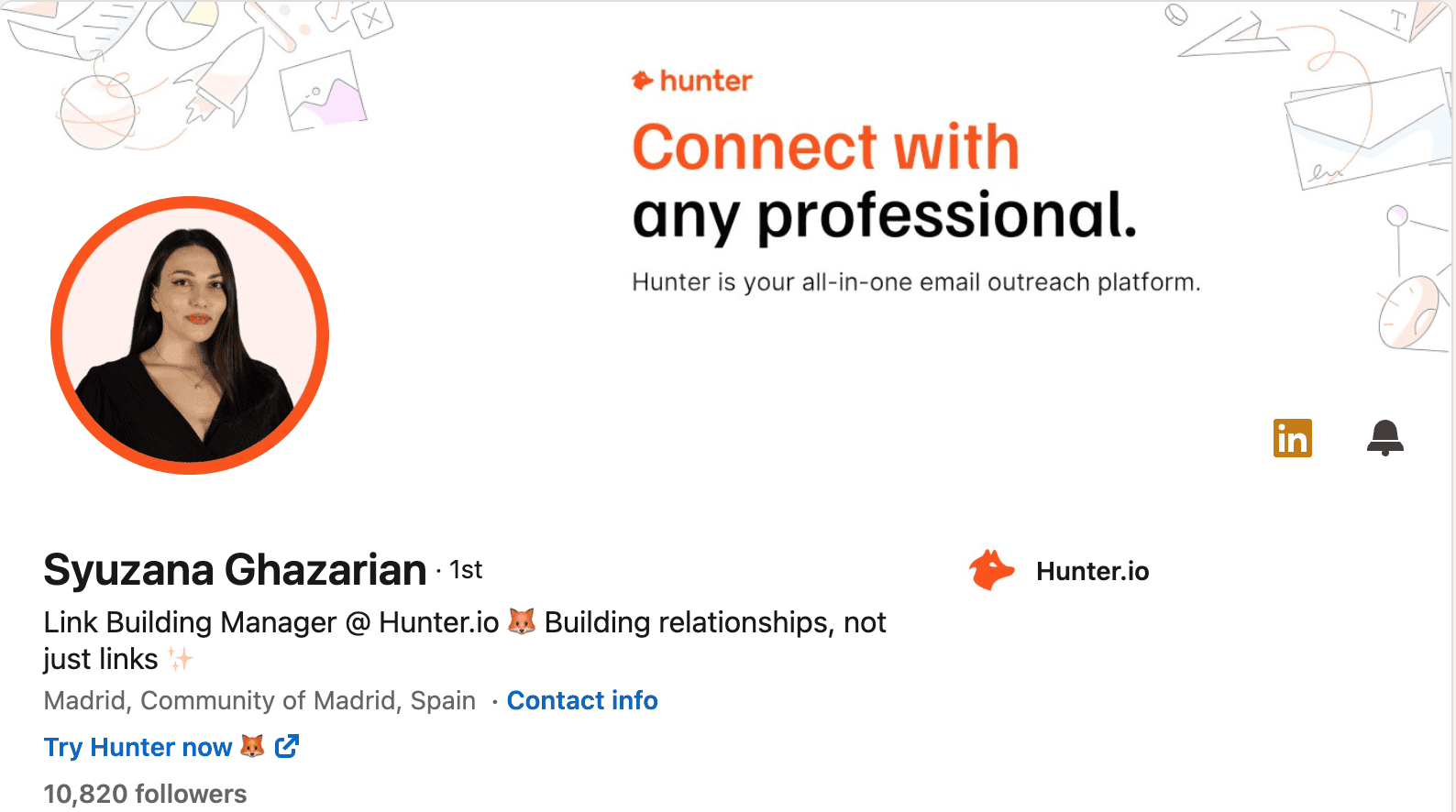
Most LinkedIn banners are a stock photo of a city skyline. They look fine. They communicate nothing. That 1584×396 pixel space above your headline is the largest visual on your profile, and almost everyone leaves it blank or decorative.
State what you do, who you help, and one proof point. “Helping B2B SaaS companies book 30+ demos/month” or “500+ agencies served. Book a free audit.” Canva has free templates that make this a 20-minute project.
Last year I helped a sales consultant redesign his banner. His old one was a stock photo of a mountain. We replaced it with “I help sales teams close 40% more deals with better cold outreach” in white text on a navy background. Nothing fancy. But combined with a rewritten headline, his weekly profile views jumped from around 60 to over 200 within three weeks. The banner-headline combo is what visitors see before they read a single word of your bio.
A Headline That Speaks to Buyers, Not Recruiters
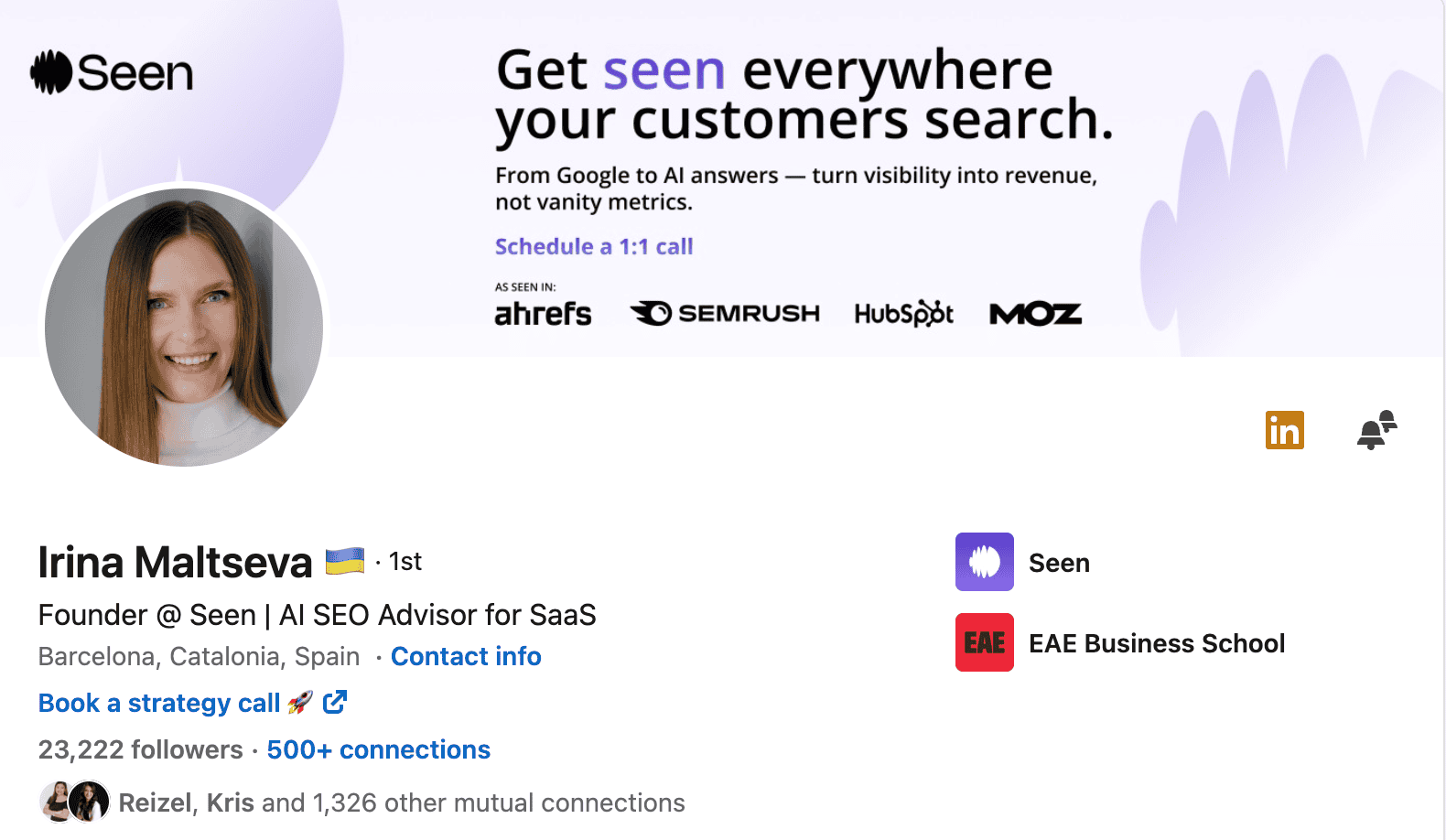
Your headline follows you everywhere on LinkedIn. Search results, the feed when you comment, connection request previews, “People Also Viewed” sidebars. It’s the single most visible piece of text on your profile.
The default move is to list your job title: “Marketing Manager at Acme Corp.” This tells a prospect nothing about whether you can solve their problem.
Before: “Founder & CEO at GrowthLab Digital”
After: “I help B2B founders build outbound systems that book 20+ meetings/month | 200+ clients served”
Before: “Freelance Copywriter”
After: “Conversion copywriter for SaaS landing pages | 3x avg. lift in trial signups”

Include keywords your prospects actually search for. If you’re a personal branding consultant, that phrase should be in your headline. If you run a LinkedIn ads agency, “LinkedIn ads” needs to be there. The cap is 220 characters. Most people use maybe 40.
Your About Section: A Mini Sales Page, Not a Bio
I rewrote a founder’s About section last spring. His original opened with “Visionary leader with 12+ years of experience driving digital transformation across enterprise organizations.” Twelve years of experience and the first line said absolutely nothing about what he does for clients. We replaced it with “Most B2B teams burn 30+ hours a week on manual prospecting that converts at 2%. We fix that.” His profile views doubled in 10 days. Same person, same network, same content output.
About half of LinkedIn users haven’t written an About section at all, so filling yours in already puts you ahead. But the real job of this section is to work like a landing page.
LinkedIn mobile cuts off your About section after about 275 characters, showing a “See more” link. Those first two lines carry all the weight. If they start with “Seasoned professional with 15+ years of cross-functional leadership experience,” nobody is tapping to read more.
A three-paragraph structure that works:
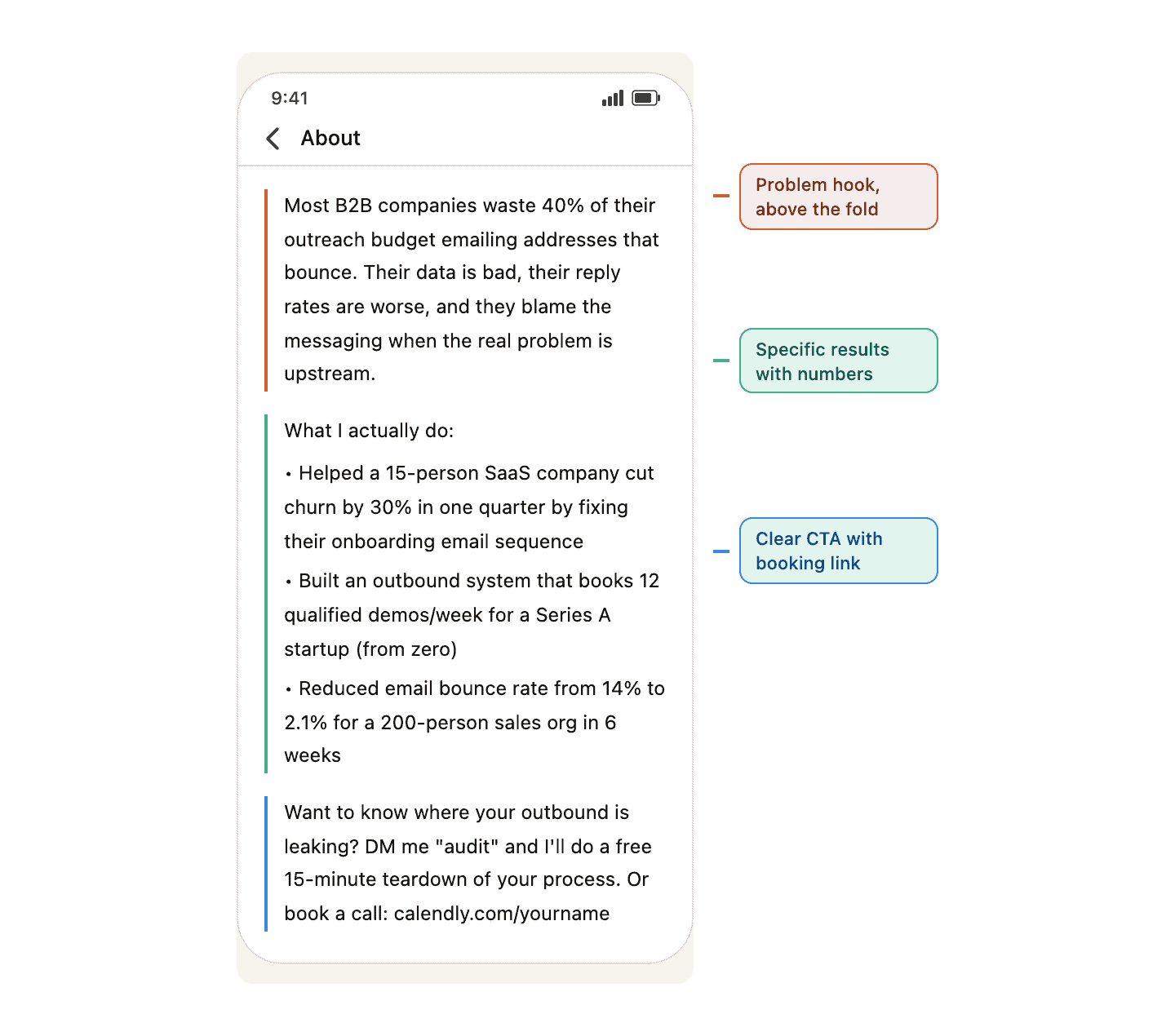
Paragraph 1: Lead with the problem. Write it like you’re explaining what you do to someone at a coffee meeting. “Most B2B companies waste 40% of their outreach budget emailing addresses that bounce. Their data is bad, their reply rates are worse, and they blame the messaging when the real problem is upstream.”
Paragraph 2: Show results. Three bullet points with specific client wins or metrics. Not “helped companies grow” but “Helped a 15-person SaaS company cut churn by 30% in one quarter.” The kind of specifics with real numbers and timeframes that make a skeptical buyer think “okay, this person actually does this.”
Paragraph 3: Tell them what to do next. “DM me ‘audit’ for a free 15-minute teardown of your outbound process” or “Book a call: [link].” If someone read your entire About section, they’re already interested. Don’t make them figure out the next step on their own.
If your prospects search for social media lead generation, work that phrase into your problem statement or results naturally. But read it out loud first. If it sounds like SEO copy, rewrite it.
Experience and Skills: Where Credibility and Keywords Overlap
Your Experience section is where prospects decide whether you’ve actually done the thing you claim you can do. It’s also a keyword bank that feeds LinkedIn search. Treat it like both.
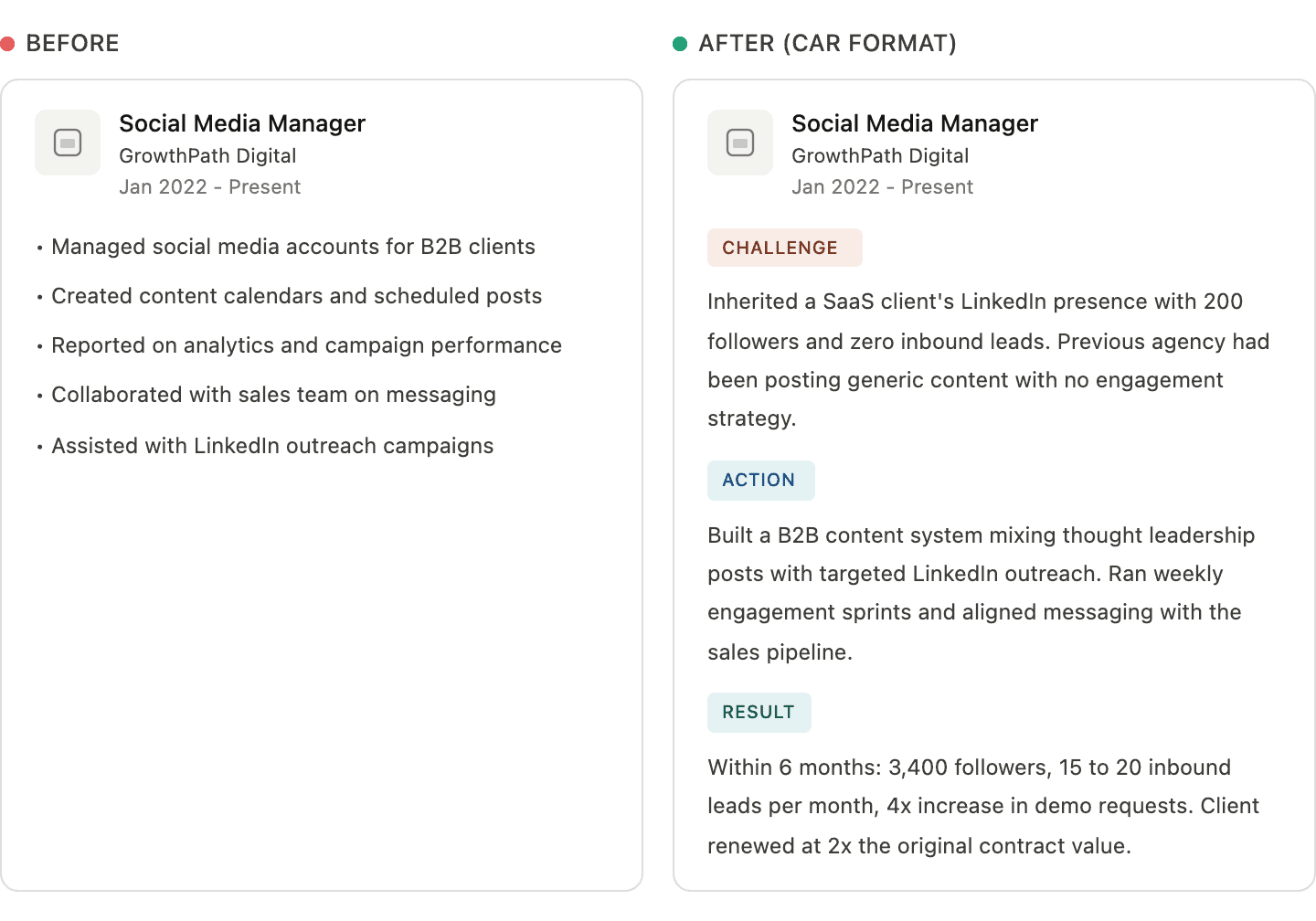
For each role, try the CAR format: Challenge, Action, Result. Instead of “Managed social media accounts for B2B clients,” write: “Inherited a SaaS client’s LinkedIn presence with 200 followers and no inbound leads. Built a content system mixing thought leadership with targeted engagement. Within 6 months: 3,400 followers, 15–20 inbound leads per month, 4x increase in demo requests.”
Pull keywords from the language your buyers use. If you run a lead generation agency, your Experience entries should naturally include terms like “LinkedIn outreach,” “B2B pipeline,” and “appointment setting.” Not stuffed in, but woven into the story of each role.
The Skills section is underrated for search. According to LinkedIn’s talent blog, members who list at least one skill get up to 2x more profile views and 4x more messages. You can list up to 100 skills. You don’t need all of them, but 30–50 relevant ones gives you broad keyword coverage that compounds over time.
Endorsements are easy social proof. The fastest way to get them: endorse 10–15 connections this week for skills you actually respect. A good chunk will endorse you back within days.
Featured Section and Social Proof
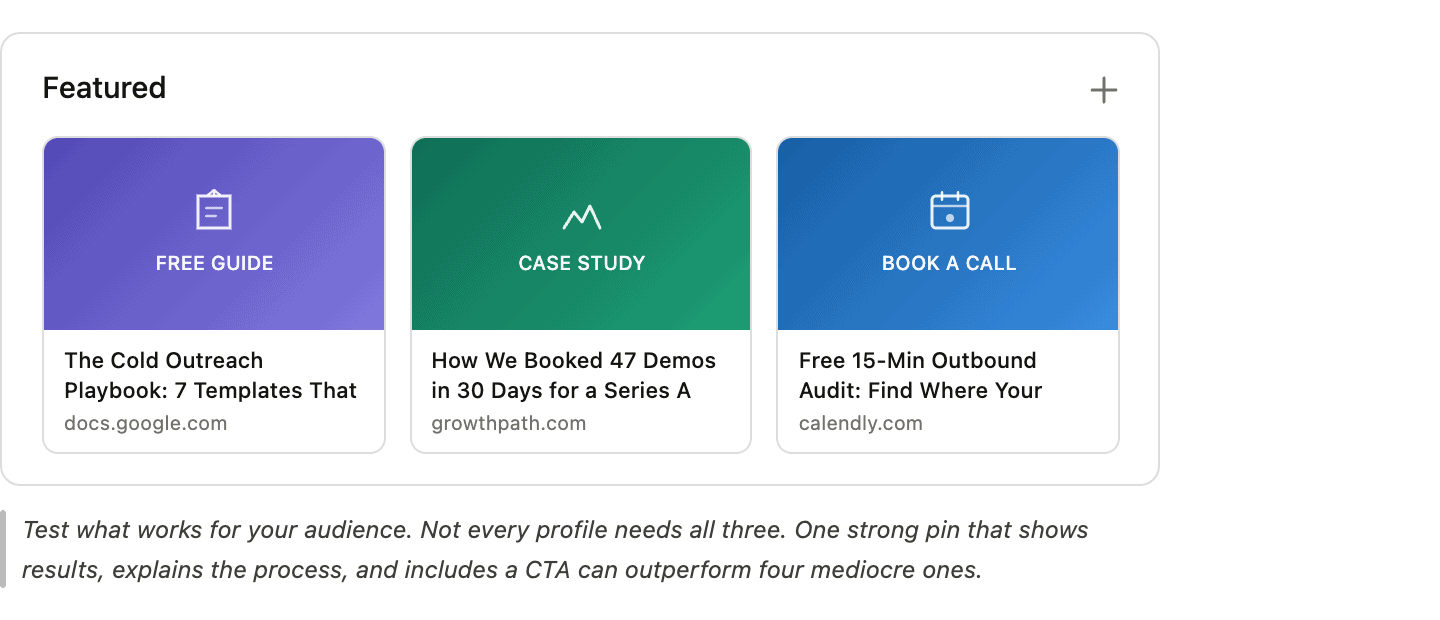
I’ve tested a lot of different Featured section setups and the honest answer is that there’s no universal formula. What has worked best for the profiles I’ve helped optimize is pinning a lead magnet for visitors who aren’t ready to talk, a case study for visitors who want proof, and a booking link for people ready to have a conversation. But those categories blur more than you’d think. A SaaS founder I worked with pinned a single case study video and nothing else, because that one piece showed the result, explained the process, and ended with a CTA all at once. He was getting more clicks from one strong pin than another client was getting from four mediocre ones.
The broader point: pin something that gives visitors a reason to take a next step. What that looks like depends entirely on what you sell and who you sell it to. Test it. Swap things out quarterly.
Recommendations matter more than most people think. Prospects trust what other people say about you over anything you write yourself. When you ask for a recommendation, don’t just say “Can you write me one?” Ask them to mention a specific result: “Could you mention the 40% increase in qualified leads we saw in Q3?” That gives them a starting point and ensures the recommendation includes actual evidence.
From Profile Viewer to Lead: The Outreach Bridge
Your profile is optimized, you’re posting consistently, and you’re getting views. Now what? LinkedIn shows you who viewed your profile (with limits on the free plan), but your follow-up options are narrow: a connection request or a DM. Both land in an inbox that’s getting noisier by the quarter.
The better move is to take the conversation to email.
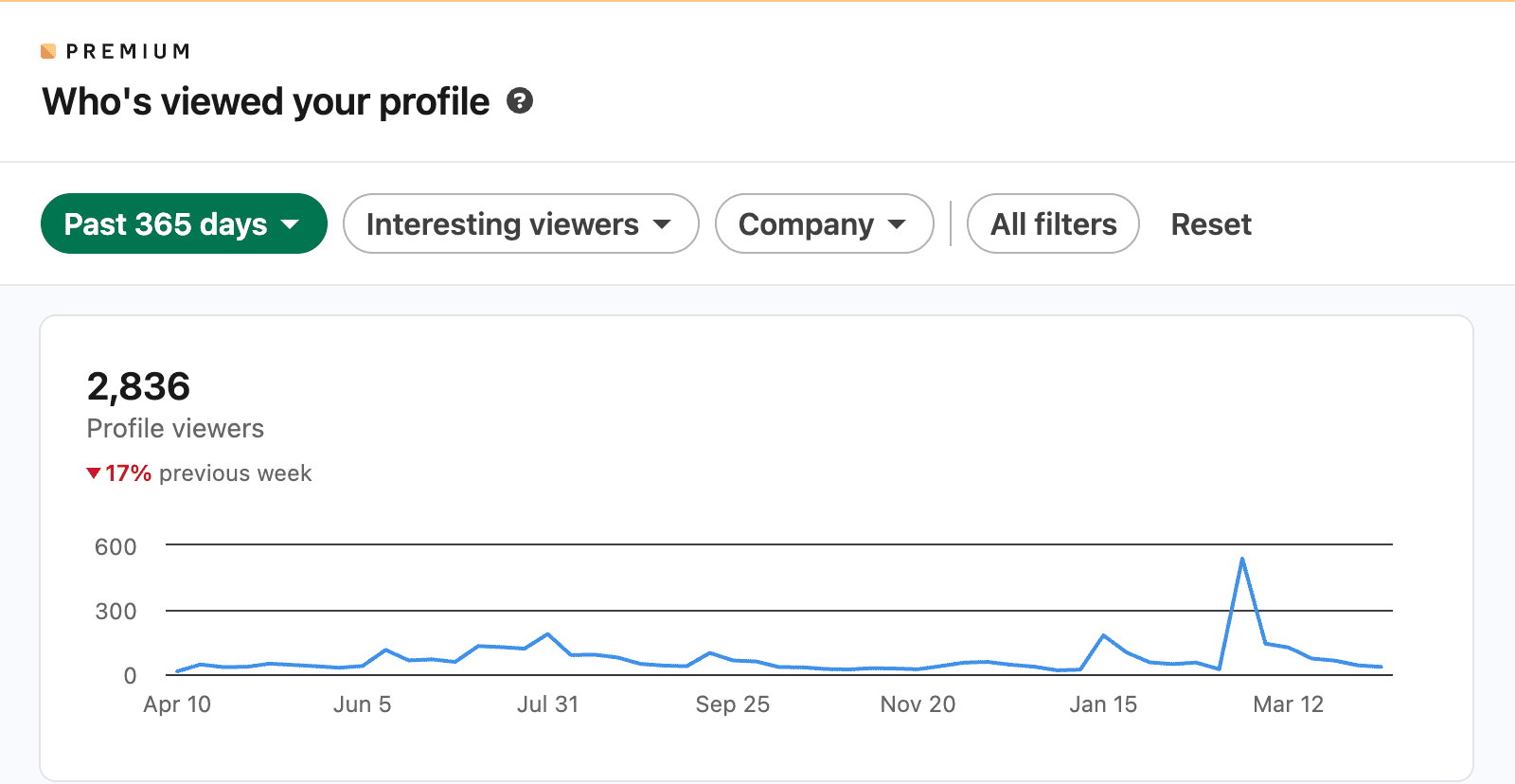
Step 1: Check “Who Viewed Your Profile” weekly. Filter for titles and companies that match your buyer profile.
Step 2: Find their verified email address. Hunter’s Email Finder takes a name and company domain and returns a verified professional email in seconds. No guessing at formats, no bounced messages.
Step 3: Send a short email referencing their visit. Not a cold pitch. Something like: “Hi [Name], saw you checked out my LinkedIn this week. I work with [type of company] on [outcome]. Happy to share what’s working if that’s relevant. Either way, good to connect.” Low pressure, three sentences.
Why email instead of LinkedIn DM? Because LinkedIn inboxes are getting crushed. According to Hunter’s State of Cold Email report, LinkedIn is now the preferred outreach channel for 50.5% of decision-makers, compared to 25% for email. That means LinkedIn inboxes are twice as crowded as email inboxes. A short email referencing a profile visit doesn’t feel cold. You’re already on their radar from LinkedIn, so email becomes a second touchpoint, not a first.
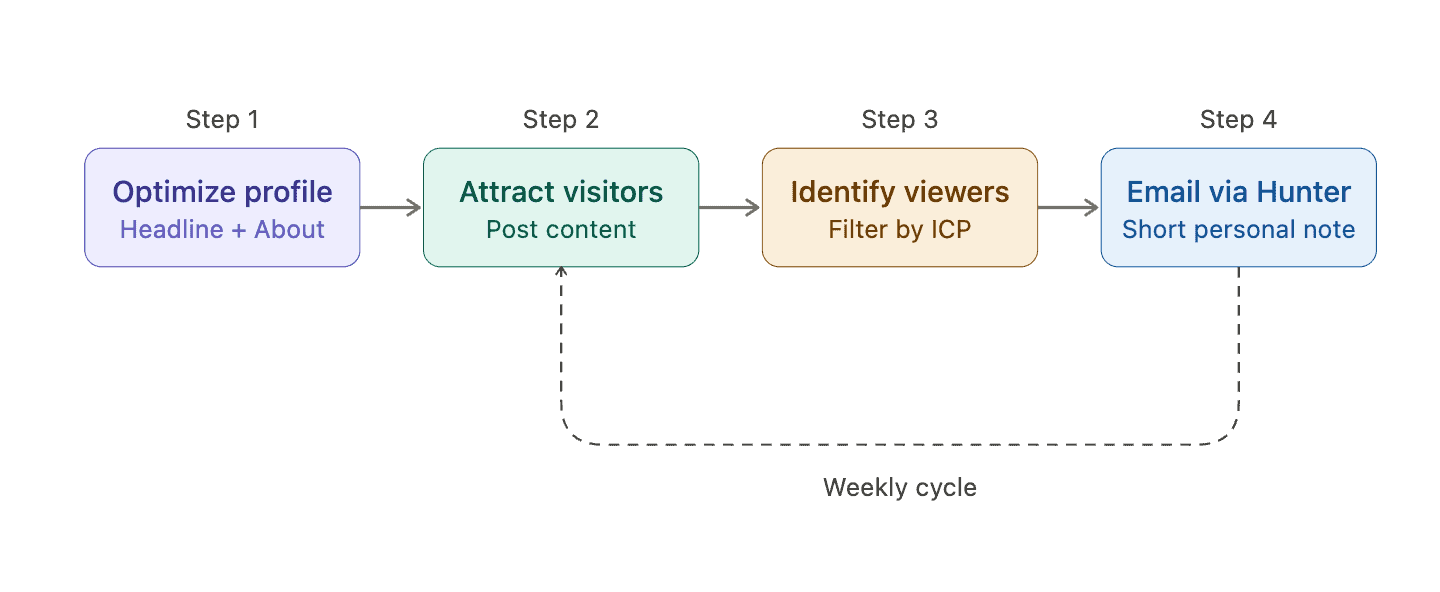
The whole system runs on about 30 minutes a week once you’ve got it dialed in.
The Weekly Cadence That Keeps Leads Coming
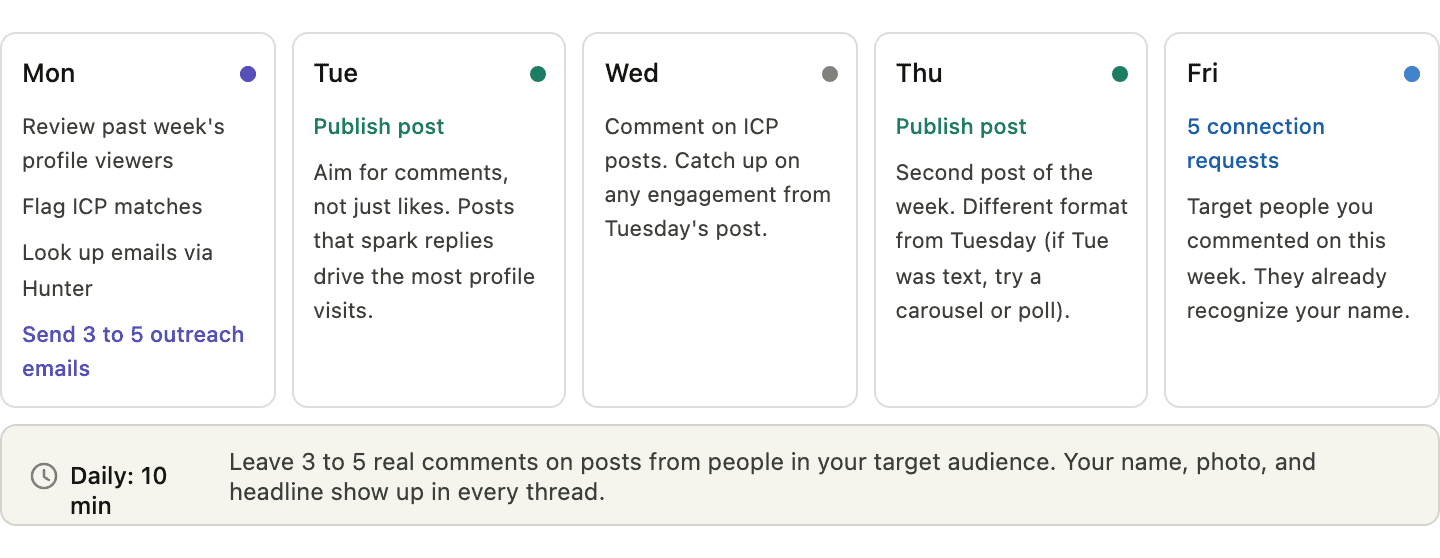
Monday: Review profile viewers from the past week. Flag ICP matches. Look up emails using Hunter, send 3–5 short outreach messages.
Tuesday and Thursday: Publish one post each day. These surface your name, photo, and headline in your network’s feed. Posts that generate comments (not just likes) drive the most profile visits.
Daily, 10 minutes: Leave 3–5 real comments on posts from people in your target audience. Not “Great post!” but actual thoughts that add to the conversation. Your comment carries your name, photo, and headline. Everyone reading that thread sees you.
Friday: Send 5 connection requests to people you engaged with during the week. They’ve seen your name in their comment sections already, so the request doesn’t come out of nowhere.
The part where people fall off is posting consistency. Two posts a week feels manageable until you’re buried in client work for three weeks straight. This is where content recycling helps. Tools like Bulkly let you schedule and recycle your best-performing posts automatically, keeping your feed active even when you’re heads-down on delivery. LinkedIn’s algorithm doesn’t punish recycled content the way some platforms do. A post that worked three months ago can work again if your network has grown.
I ran this cadence for a B2B agency owner last year. First month was underwhelming. Profile views went from ~90/week to ~140, and he was ready to quit. By month three, he was hitting 400+ weekly views, getting 6–8 inbound connection requests from marketing directors weekly, and had booked 3 discovery calls purely from the Monday outreach emails. These systems compound, but the compounding is invisible for the first 6–8 weeks, which is exactly when most people give up.
A caveat: none of this works if the profile itself isn’t dialed in. I made that mistake early on with a different client. He was running the full cadence (posting twice a week, commenting daily, sending connection requests) but his headline still said “Senior Account Executive at [Company]” and his About section was three vague sentences about leadership. More views, zero conversions. We paused everything, rewrote the profile, restarted the cadence. Within two weeks his inbound DMs went from zero to 2–3 per week.
Mistakes That Quietly Kill Your LinkedIn Lead Gen
I audited about 40 profiles for clients last quarter and kept a running tally of what I saw. The results weren’t surprising, but the concentration was. The same five problems showed up on almost every profile, often all at once.
Headlines that just listed a job title. “Director of Business Development at XYZ Corp” appeared in some variation on maybe 30 of those 40 profiles. Every single one of those people was posting decent content. None were converting viewers into conversations because the headline gave prospects zero reason to care.
About sections that read like résumé summaries were almost as common. “Results-driven professional with 15+ years of experience in cross-functional team leadership and strategic planning.” I can feel my eyes glazing over typing that. Your About section is the one place on LinkedIn where you get to talk directly to a potential buyer. Starting with your years of experience instead of their problem is like opening a sales call by reading your own bio.
I went through all 40 profiles looking for a single call to action (a booking link, an email, a “DM me”) and found one on maybe 8 of them. The other 32 had essentially built a storefront and then locked the front door. What’s the point of driving traffic to a profile that gives the visitor nowhere to go?
One that surprised me: posting without engaging. Several people were publishing 2–3 posts a week but never commenting on anyone else’s content. LinkedIn’s algorithm rewards back-and-forth. Publishing into a void and expecting results is like hosting a dinner party and never talking to your guests.
And then there’s the 2026 problem that nobody had two years ago: AI-generated content that reads like AI. LinkedIn’s audience has gotten very good at spotting it. The perfectly structured, emotionally flat, “let’s dive in” style is instantly recognizable now. I have a strong opinion on this that goes beyond just “it hurts your engagement.” Once prospects clock that your content isn’t yours, the trust damage bleeds into everything else on your profile. Your About section reads differently. Your recommendations feel curated rather than earned. Your headline sounds like a prompt output. It poisons the whole thing retroactively, and I don’t think most people realize how much credibility they’re burning.
The fix is straightforward: build your content strategy around real stories from your work, use specific numbers, and read every post out loud before publishing.
Measuring Whether Any of This Is Working
Profile views per week is the number I check every Monday morning. Not just the total, but who’s viewing. LinkedIn’s dashboard shows job titles and companies. If views are climbing but the viewers are mostly students and job seekers, your content is attracting the wrong audience and your headline probably needs work. I had a client last year whose views tripled in a month but the quality actually got worse, because she’d started posting broad motivational content that went semi-viral with the wrong crowd. We pulled her back to niche posts about B2B email deliverability, her views dropped by half, and her inbound leads went up. The vanity metric and the business metric pointed in opposite directions.
Inbound connection requests from people who fit your buyer profile is the second thing to watch. If views are up but requests aren’t following, something between the headline and the About section is breaking. Usually it’s the About section. People read the headline in the feed, click through, then lose interest when the bio doesn’t match the promise.
Check your Search Appearances dashboard too. LinkedIn tells you which keywords people used to find your profile. If you’ve optimized for “B2B lead generation” but you’re showing up for “marketing manager jobs,” your keyword strategy needs adjusting.
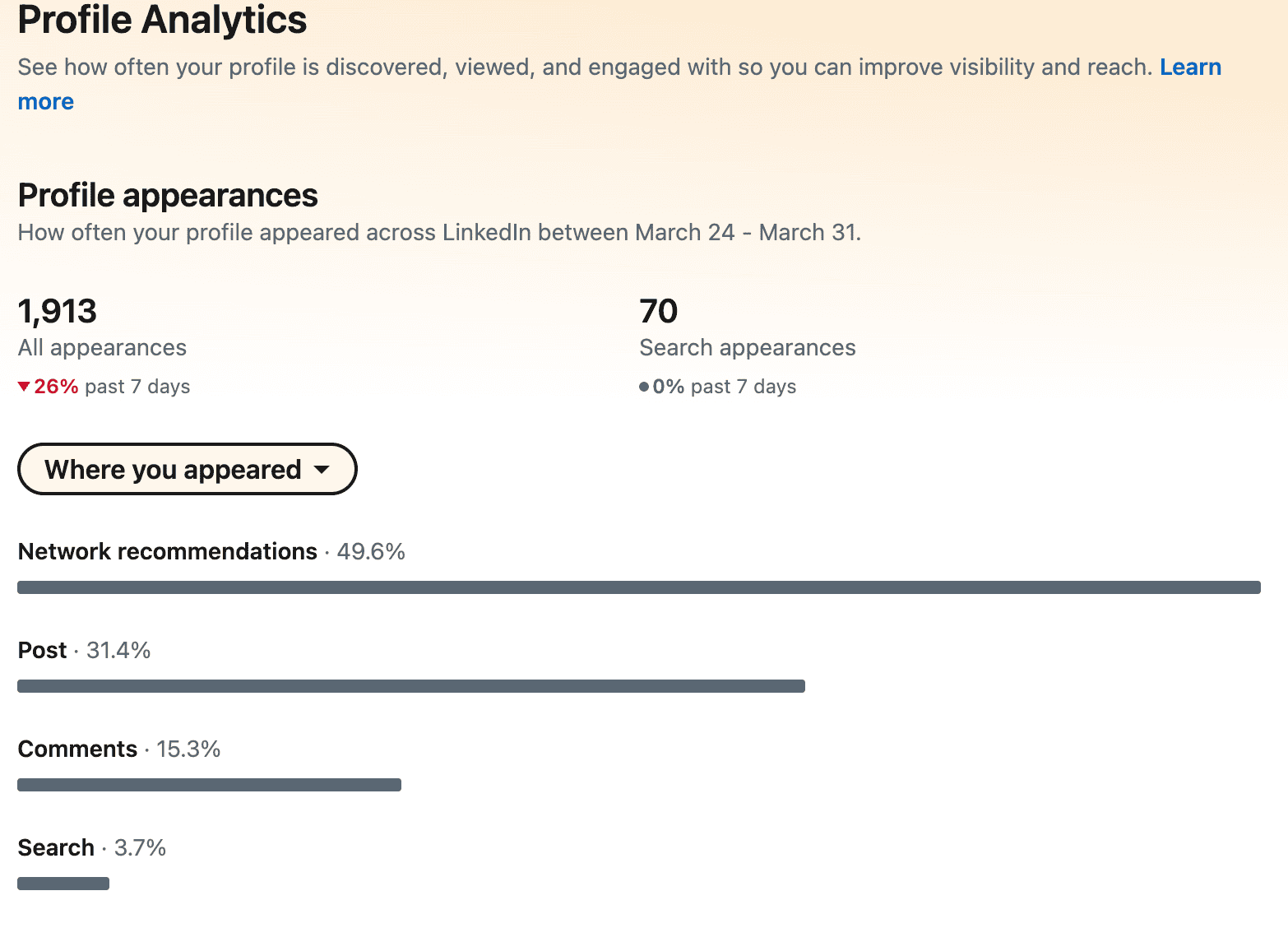
Your Social Selling Index score is worth a quarterly check. Social selling leaders create 45% more opportunities than peers with lower scores. The SSI won’t tell you exactly what to fix, but a score trending upward over 3–6 months generally tracks with the kind of profile activity that generates leads.
Start With Your Headline
Rewrite your headline this afternoon. Who you help, the result you deliver, and a proof point if you have one. That single change affects every impression you make on the platform: in the feed, in search, in comment sections, everywhere.
The About section is next. Lead with the prospect’s problem, not your résumé. Add a CTA. Realistically, the headline and About section are an afternoon’s work if you stop overthinking them. The weekly cadence takes a few weeks to become habit. The outreach bridge compounds from there.